
Google Play App Optimization is the process of improving your app’s visibility and conversion rate within the Google Play Store. It’s critical for your product’s success, as most app discovery still happens directly in the store.
Consider this:
According to Statista, global Play Store downloads are projected to reach 143 billion by 2026. As the store expands and competition intensifies, the window for a new app to get noticed is narrowing.
In this hyper-competitive market, ASO is no longer an optional marketing task. It is a non-negotiable survival strategy. From this comprehensive guide, you’ll learn all about the modern Google Play ranking algorithm and how to build an effective optimization strategy for sustainable growth.
Table of Contents
What Is Google Play App Optimization?
Google Play Store ASO is a continuous, data-driven practice that improves how an app is discovered, evaluated, and chosen by users. It focuses on aligning your product with user intent while maximizing conversion rates once your app is visible.
An effective ASO for Google Play typically includes:
- Keyword strategy to match search intent and semantic relevance
- Metadata optimization (title, short description, long description) for indexing and persuasion
- Creative asset optimization to improve conversion from store visitors to installs
- User signal management, including ratings, reviews, and behavioral performance
- Localization and experimentation to scale performance across markets
When done correctly, ASO doesn’t just bring short-term spikes. It drives compounding organic growth.
ASO and SEO: What’s the Difference
App Store Optimization (ASO) and Search Engine Optimization (SEO) share the same core goal: improving visibility for high-intent users. And though beginners may use these terms interchangeably, they operate in different environments.
SEO refines websites for search engines like Google using content, backlinks, technical performance, etc. ASO optimizes apps for app stores, such as Google Play, through metadata, creative assets, and user behavior signals.
The key difference lies in how rankings are determined. SEO relies heavily on external authority signals (links). In ASO, Google Play prioritizes relevance, conversion, engagement, retention, ratings, and reviews. Keywords matter in both. Yet, ASO interprets them through semantic context and app topics, not exact matches alone.
By 2026, ASO and SEO increasingly overlap through AI-driven discovery, deep linking, and connected web–app search experiences. As a result, the ASO vs SEO distinction is becoming less rigid, making ASO a natural extension of modern SEO strategies.
How the Google Play Ranking Algorithm Works
The Google Play Store uses a complex ranking algorithm to determine which apps appear in search results and recommendations. Here are the factors that impact your app’s discoverability:
- Keywords and metadata. Google’s NLP (Natural Language Processing) scans your title, short description, and long description to categorize your app. Unlike iOS, Google indexes the entire long description, so the correct use of keywords is vital.
- Android vitals and technical health. Metrics like crash rate, ANRs (Application Not Responding errors), load speed, and stability affect rankings. High-quality apps earn better placement.
- Download and active installs. It’s not just about total downloads. The system also tracks how many users keep the app vs uninstall it immediately. A high uninstall rate can lower rankings.
- User sentiment. Star ratings (ideally 4.0+) and positive review content act as trust signals. Google also extracts keywords from user reviews to rank your app for terms you might not have included in your metadata.
- Update frequency. Regular updates help maintain positive user signals.
- AI discovery. Google increases the use of AI and machine learning models (like LSTM) to interpret app topics, semantic relevance, and user intent. AI understands semantic clusters, and groups apps by their actual utility rather than just category. For instance, your app can rank for “relaxing sounds” even if your primary keyword is “sleep aid,” because the AI understands they address the same user need.
For a deeper dive into how the ranking factors interact, see our article: ASO Ranking Factors: Learn How Google Play Algorithms Work.
Google Play Store ASO: Keyword Research and Strategy
The basis of every successful ASO strategy is keyword research. It determines which searches your app appears in and directly impacts its discoverability. Here are a few tips on how to choose good search terms for your app:
- Target relevant and realistic keywords. Does this term accurately describe your app? Can you realistically rank in the top results?
- Build semantic clusters and use long-tail keywords. Don’t rely on a single “magic” word. For example, if your app is about budgeting, add phrases like “Expense Tracker” or “Money Manager.” Besides, remember that longer, more specific phrases, such as “simple money manager with bank sync” usually have lower competition and higher conversion rates.
- Analyze your competitors. Don’t reinvent the wheel. Study the search terms that drive installs for your competitors to find gaps and opportunities.
- Prioritize by traffic and difficulty. We suggest ranking keywords based on potential traffic, competitiveness, and relevance to your app. The best idea is to focus on a mix of high-volume and niche terms.
- Don’t ignore seasonal and event-driven opportunities. Search behavior changes with the calendar. You can adjust your keywords for holidays and special events to capture temporary but high-intent traffic spikes.
Helpful Tools for Keywords Discovery
An effective ASO today requires more than just guessing. To help you build a truly data-driven strategy, Asolytics offers a full set of instruments:
- Keyword Tracking Is a tool that stores the collected keywords and shows how they perform in real time in a specific app store.
- Recommended Keywords Automatically generates relevant keyword ideas from app metadata, competitors, and AI-based suggestions.
- Metadata Keywords Extracts keywords from your and competitors’ metadata to find high-value terms.
- Ranking tool Shows which keywords an app ranks for and how positions change over time.
- Keyword Analyzer Provides all main performance data for a specific term to help you access its optimization potential.
- Autosuggest tool Offers real user search autocomplete terms to expand keyword coverage.
- Related Keywords Finds additional niche-relevant and category-specific keyword opportunities.
Use these Asolytics tools when creating your strategy. With their help, you can quickly build the efficient keyword backbone for your 2026 Google Play ASO roadmap.
Google Play ASO Optimization: Metadata
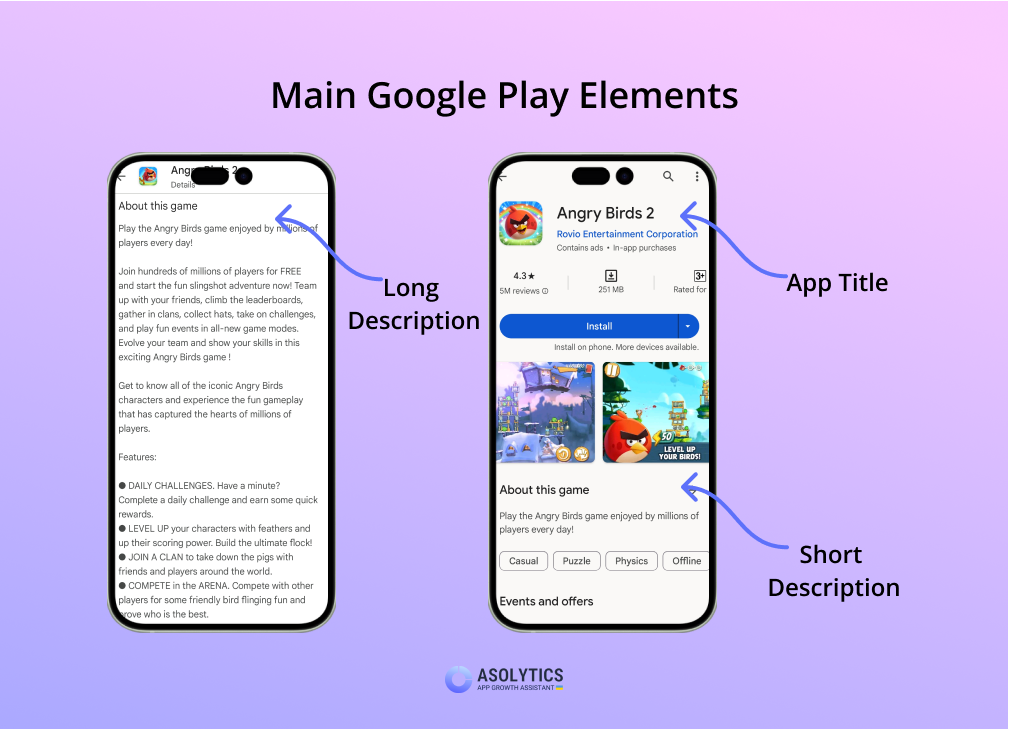
On Android, your metadata is your primary ranking lever. Unlike iOS, Google Play crawls your entire store listing to build its index. Your app’s title and descriptions help Google understand what the app is about. Furthermore, it often influences whether users decide to install. Reviews can also provide semantic signals about your app that help Google understand its content and purpose. They are not a direct keyword field, though.
Read on to learn how to optimize each text field properly.
App Title
One of the strongest ranking factors in the Play Store is your app’s title. It’s the first thing users and algorithms see. To craft an ASO-friendly title, keep these rules in mind:
- Keep it under 30 characters.
- Avoid keyword stuffing. We recommend including only 1 primary term that clearly describes your product’s core function.
- Keep your title clear, readable, and natural. Make sure it doesn’t contain any unnecessary separators or forced phrasing.
- Ensure it reflects real app functionality to prevent negative user signals.
- Balance brand and search terms. Established brands can place the brand name first and the keyword next. But if you’re new to the market, it is better to do the opposite.
Would you like to see a more detailed breakdown? Read our article: Google Play Title: How to Use Keywords in Main Text Assets.
Short Description
The short description plays a dual role. First, it contributes to search indexing. Second, it strongly impacts conversion rate. The short description appears prominently on the store listing and should immediately communicate value.
Here are a few optimization tips to follow:
- Remember that short description should be short and keep it under 80 characters.
- Use 1-2 relevant keywords naturally without compromising clarity.
- Highlight the app’s primary benefit or use case in the first line.
- Focus on what the user gains, not just features.
Long Description
The Long Description is where Google Play Store search optimization most closely resembles traditional SEO. With up to 4,000 characters available, you can naturally incorporate keywords while covering related concepts and use cases. Yet, avoid stuffing at all costs. Google algorithm is now smart enough to detect and penalize unnatural texts.
Structure your content with short paragraphs, bullet points, and subtitles. This way, you’ll improve readability for users. It also helps Google’s NLP identify the most important sections of your text.
Creative Asset Optimization
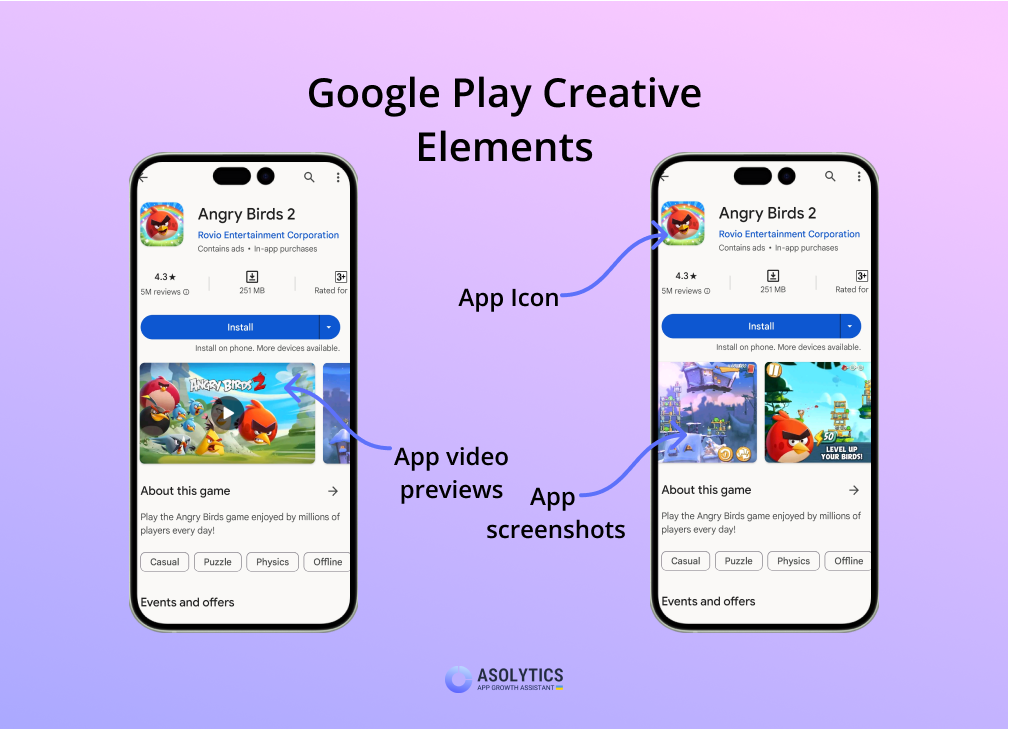
Creative assets have a significant impact on conversion rates. Based on visuals alone, users often decide whether to download an app or skip it. In 2026, strong visuals aren’t optional. They’re a core part of ASO.
App Icon Design
Your icon is your brand’s “face,” so it must communicate value at a glance. Follow these best practices:
- Keep your icon simple and recognizable, even at small sizes. Clear shapes, limited color palettes, and strong contrast perform best.
- Make sure your icons align with your brand identity across platforms to build trust and recognition.
- Analyze common visual patterns in your category. Then, differentiate through color, symbolism, or minimalism.
- Test different icon concepts to find what converts best. For instance, a recognizable face increases CTR for games, while clean geometry works better for productivity apps.
Screenshot Optimization
Screenshots are your primary persuasion tool on Google Play. Their job is to clearly communicate value and convince users to install. The first three screenshots are especially critical: they should immediately explain what the app does and why it’s worth downloading.
Also, prioritize portrait screenshots over landscape formats for better app store optimization. Android vertical phone screens typically display portrait images more naturally and make it easier for users to understand your app’s message at a glance. As for the text overlays, try to make them short (ideally under 5 words) and benefit-focused. We recommend using high-contrast “callout” text that is readable without zooming.
Video Content Strategy
Video is gaining importance thanks to YouTube integration and richer store placements. To maximize impact, follow these guidelines:
- Keep videos under 30 seconds and focused on core functionality.
- Hook users in the first 15 seconds by demonstrating immediate value.
- Show real app usage, not just abstract animations.
- Since videos often autoplay muted, use heavy on-screen text and subtitles to convey the message without sound.
To understand what works in your niche, try Asolytics’ Competitors Visual Analysis tool. With its help, you can compare icons and screenshots your competitors use and find opportunities to stand out.
ASO for Google Play: Ratings, Reviews & User Signals
Keywords tell Google what your app is. But user signals tell Google how good it is. An app with perfect metadata but poor user signals will inevitably lose rankings over time.
The Role of Star Ratings in ASO
Star ratings are the most visible trust indicator. Apps with higher average ratings are favored in search results and appear more trustworthy to users. Even small increases in rating can lead to measurable conversion gains. It’s also important to note that Google places more weight on recent ratings than on reviews from years ago.
To encourage positive feedback:
- Use the Google Play In-App Review API to request ratings at a “moment of delight” (e.g., after a user completes a task or levels up).
- Never block user progress with a rating prompt. This often results in frustrated, low-star “spite reviews.”
- Maintain a consistent update cycle, which triggers new reviews organically.
How to Reply to User Feedback Strategically
Responding to reviews improves trust and signals active app management. Google has explicitly stated that developers who respond to reviews build better user sentiment – something the algorithm rewards. When you reply to a 1-star review and solve the user’s issue, Google sends them a notification. And if the response is helpful, the reviewer may even update their rating.
But user signals are more than just reviews. They also include uninstalls, retention, and Android vitals. Negative signals, such as high uninstall rates, low retention, frequent crashes, or ANRs, can suppress rankings regardless of keyword strength.
To minimize these risks:
- Align store listing promises with real in-app experience
- Improve onboarding to reduce early churn
- Continuously fix bugs and performance issues that commonly drive negative feedback
Localization & International Growth
By 2026, the fastest-growing markets for Android are in Southeast Asia, Latin America, and MENA. Well-localized store listings improve search relevance, conversion, and trust in each region.
Localization goes far beyond simple translation. While direct translations help with indexing, cultural adaptation consistently delivers stronger results. Tailoring keywords, messaging, and visual assets to local search behavior and user expectations often outperforms one-to-one translations.
Localization matters most in non-English and high-growth markets, where competition is lower and properly adapted assets can significantly increase visibility. To scale effectively, track rankings, conversion rates, and installs by country and language. Then, prioritize markets based on real performance data. For more details, see Android App Localization: Effective Tool for Entering New Markets.
A/B Testing and Experimentation
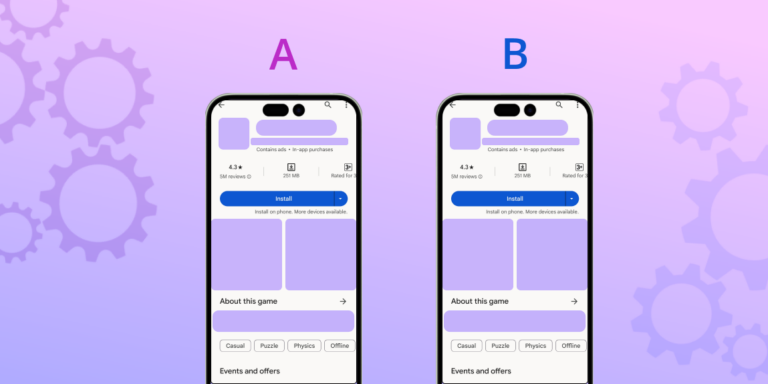
The successful ASO Android strategy is driven by data, not intuition. Google Play provides a powerful native tool – Store Listing Experiments – that allows you to test different versions of your assets on a live audience. You can run A/B tests on your app icon, feature graphic, screenshots, promo video, and even localized text.
To ensure reliable results, test one element at a time. For example, compare two icon variants, but keep the screenshots unchanged. If you alter everything at once, it becomes impossible to identify what caused the lift or the drop.
Note: A/B testing requires sufficient traffic to be meaningful. If your app has low impressions or installs, test results may be misleading. In such cases, focus first on foundational ASO improvements before experimenting.
Measure Your ASO Success
The journey doesn’t end once you learn how to publish an app on Google Play properly. In fact, that’s when the real work begins. To understand whether your ASO efforts are working, you need to study specific Key Performance Indicators (KPIs). Tracking the right KPIs helps turn your strategy into a repeatable, data-driven growth process.
The metrics we suggest to monitor include:
- Search impressions and installs. Are people seeing your app in search, and more importantly, are they clicking?
- Keyword rankings. How many keywords rank in the top 10 results?
- Conversion rate (CVR). What is the percentage of users who visit your listing and actually download?
To simplify performance analysis, you can use the Asolytics platform. It contains tools to study keyword rankings, research performance trends, and analyze competitors. With their help, you can more easily connect changes in metadata or visuals with shifts in impressions and conversion rates.
7 Common Google Play ASO Mistakes to Avoid
Even high-quality apps can underperform on Google Play due to avoidable ASO mistakes. Here are the most common ones:
- Keyword stuffing and unnatural metadata Google’s algorithm is highly sensitive to forced or unnatural text. Overloading titles or descriptions with keywords will likely lead to a ranking penalty.
- Overlooking Promotional Content opportunities Use the “Events” tab to showcase major updates and offers. Ignoring it means you’re missing out on a massive organic visibility boost.
- Poor review response strategies Generic or defensive replies to negative reviews can be as harmful as no response at all. Take a few minutes to show users that real humans are listening and improving the app.
- Copy-pasting iOS metadata to Android for app store optimization Google Play and App Store rely on different ranking signals and layouts. Metadata optimized for iOS rarely performs well on Android without adaptation.
- Neglecting localization opportunities Relying solely on English restricts growth in high-potential markets. Even partial localization can significantly improve discoverability and conversion.
- Ending A/B tests too early Stopping tests after 3 days because one variant looks like a winner often leads to “false positives.” Let experiments run for at least a couple of weeks so you can gather enough user behavior to actually learn what’s working.
- Paying no attention to Android Vitals If your app is battery-draining and crash-prone, Google will quietly bury it in search results no matter how good your keywords are.
Avoid these mistakes, and your ASO efforts will turn into sustainable visibility and installs rather than short-term gains.
Final Thoughts: Build Your 2026 ASO Roadmap
Google Play app page optimization in 2026 is a data-driven system that combines creative assets, user signals, localization, and experimentation. The apps that win are not those that focus solely on keywords, but those that optimize the entire user journey – from the first search impression to the first 24 hours of retention.
By applying the principles outlined in this guide, you can maximize visibility, improve conversion rates, and grow installs sustainably. Audit your current store listing, prioritize high-impact optimizations, set up clear KPIs, launch experiments, and create a continuous feedback loop for long-term success. Start building your 2026 ASO roadmap today with Asolytics! And for more inspiration and guidance remember to check our blog regularly. Every improvement brings you closer to an app users love and Google rewards.