

If you still copy keywords manually from App Store or Play Store suggestions, you’re wasting hours. What should be a quick brainstorm can easily turn into a rabbit hole of endless searches, scrolling, spreadsheets, and guesswork.
Every app marketer knows this routine:
Open the App Store. Type a seed keyword. Scroll through suggestions. Copy them into a spreadsheet. Repeat for the Play Store. Check a few competitors. Estimate search volumes by guessing, and hope you didn’t miss something important.
It’s tedious. It’s slow. And honestly, it’s a terrible use of your time.
Before we get into the solution, let’s clarify what makes manual research so ineffective.
Table of Contents
The Core Problems with Manual ASO Keyword Research
Here are the main problems with manual research in many ASO services:
- Time consumption. Copying suggestions and checking rankings may easily eat up half of your day.
- Repetitive work. You simply do the same searches again and again and don’t get much new information.
- Human bias. The decisions you make are often based on gut feeling rather than real data.
- Lost opportunities. Trending and long-tail keywords slip past you unless you check daily (you don’t).
- Competitor gaps. Tracking competitor keywords across multiple apps and countries is nearly impossible without automation.
The truth is, manual research just doesn’t keep up. And in a market where your competitors are using automated ASO tools, doing it by hand puts you at a clear disadvantage.
There’s a better way.
The modern app store optimization tools use algorithms to eliminate the busywork and show keyword opportunities you’d never find otherwise. Keep reading to learn how to automate keyword research in one tool and save your time.
Why Automating ASO Keyword Research Matters
Automation changes everything. Instead of wasting hours on monotonous tasks, you can generate search terms in minutes and focus your effort on strategy and creativity.
Check out the benefits automatization brings:
- Speed. What takes several hours manually can take a few minutes with automation. This means you can research keywords for multiple apps, languages, or A/B test variations in the time it used to take for one basic analysis.
- Accuracy. Algorithms don’t get tired, distracted, or biased. They scan thousands of keyword combinations, evaluate search patterns, detect relevant terms that humans consistently overlook, and find opportunities before your competitors even notice them. Machine learning models identify correlations between keywords that aren’t obvious at first glance.
- Consistency. Automation makes regular updates effortless and ensures your keyword strategy evolves with market trends rather than lagging behind them. You don’t have to rely on someone’s memory for competitor checks or ranking updates.
- Competitive edge. Your competitors update their metadata constantly. Automated monitoring keeps you aware of competitor movements in real-time.
- Productivity. When the tedious research is handled automatically, you can focus on what actually drives results—creative A/B testing, compelling app descriptions, and conversion optimization.
Consider this: the top-performing apps in competitive categories update their keywords 2-3 times more frequently than average apps. They’re not working harder, they’re working smarter with automation.
How Asolytics Automated Keyword Research Works
Automated ASO keyword research sounds like something complex. But the core idea is simple: the tool does the time-consuming and boring work for you. Let’s take a closer look at what exactly makes an algorithm so effective.
1. It Collects Data from Multiple Sources
This tool is your research assistant that scans multiple data sources simultaneously. Here’s what it does:
- Studies all published apps in the App Store and Google Play to find real search suggestions and their rankings.
- Analyzes competitors to discover the keywords they rank for, and your app doesn’t.
- Examines search volume data that helps you understand how often users search for specific terms.
- Explores historical trends like seasonal patterns and growing or declining keywords.
All these processes that would take days and multiple tools happen in minutes and give you a much broader keyword pool.
2. Algorithms Evaluate Each Keyword
The system evaluates all keywords across several dimensions:
- Search volume. This metric shows how many users search for this term each month. High volume means higher visibility, but it also attracts more competition.
- Keyword difficulty. It’s a score that predicts whether you can realistically rank for the term, or the giants like Netflix and TikTok already dominate it.
- Traffic quality. The system analyzes data from millions of app store sessions to identify keywords where users actually install the app, not just browse out of curiosity.
- Relevance to your app’s category. Does the “meditation timer” term match your fitness app? The algorithm knows and prioritizes keywords that align with your app’s core function and Apple/Google’s category classifications.
- Ranking potential. Based on your app’s current authority (ratings, downloads, etc.), the tool calculates which keywords you can capture.
Modern app keyword tracking systems use machine learning models to quickly decide what works and what wastes your time.
3. It Creates Tailored Keyword Sets
The system doesn’t dump thousands of random keywords at you. Instead, it generates keyword recommendations tailored to your app’s specific niche, current rankings, language, and market. The tool evaluates factors, like your app’s maturity, existing keyword performance, and competitive density, to suggest achievable wins rather than impossible targets.
4. You Can Apply Results Instantly
No more copy-pasting into spreadsheets. You can export your keywords and share them with your team without extra effort. The tool also lets you apply updates to metadata with one click, then automatically tracks the results.
These recommendations refresh dynamically as search trends, competitor rankings, or seasonality change. Your keyword strategy stays current without manual monitoring.
How to Use Asolytics Automated Keyword Research
Asolytics eliminates every pain point in keyword research with a streamlined, intelligent workflow. Here’s how to automate the process in 4 practical steps:
Step 1. Find Your Competitors
Start by identifying your main competitors. You can add them through the Competitor Finder tool, or simply use Live Search to see which apps rank for your target keyword.
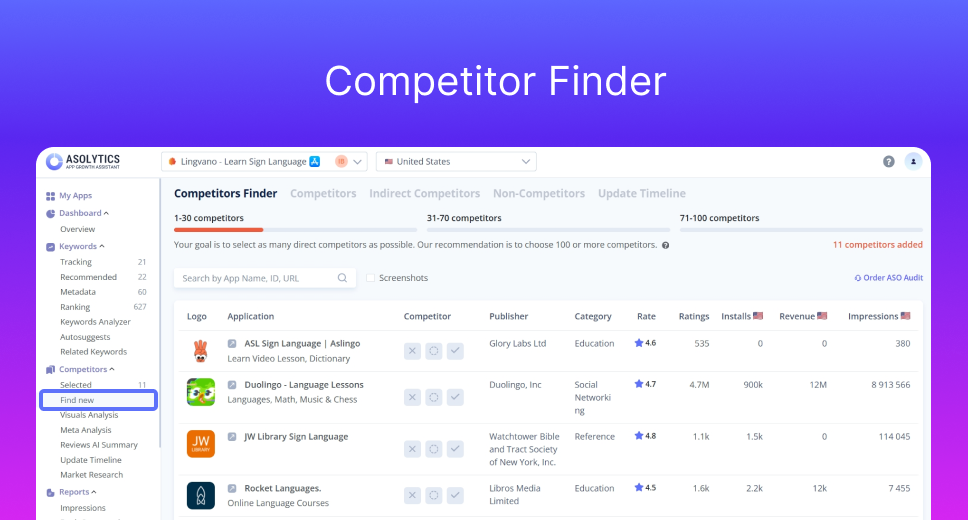
Once you add them, Asolytics automatically analyzes each competitor’s metadata, ranking keywords, and search visibility. Then, it recommends the most relevant terms based on real performance signals. No manual checking. No spreadsheet juggling. Just add competitors and let the system work.
Pro Tip: For best accuracy, add at least 30 competitors. You can include up to 100 for even stronger results.
After your competitor list is ready, Asolytics shows you:
- Every ranking keyword from all selected competitors
- Main keyword metrics
- How many top competitors use each keyword
Step 2. Study the Recommended Keywords Dashboard
Once your competitors are selected, move to the Recommended Keywords section. Its dashboard combines data from 5 intelligence sources:
- Competitors’ Intelligence – finds keywords driving installs for your competitors.
- Ranking Intelligence – discovers search terms your app already ranks for (often overlooked opportunities).
- Metadata Intelligence – extracts keywords found in competitor metadata analysis.
- Related Intelligence – detects new ideas based on terms you’re already tracking.
- Suggestions Intelligence – obtains popular keywords from App Store and Play Store autosuggestions.
No switching between multiple tools. All the information from these sources is collected automatically as soon as you mark your competitors. Your job is to review the list and separate winners from time-wasters.
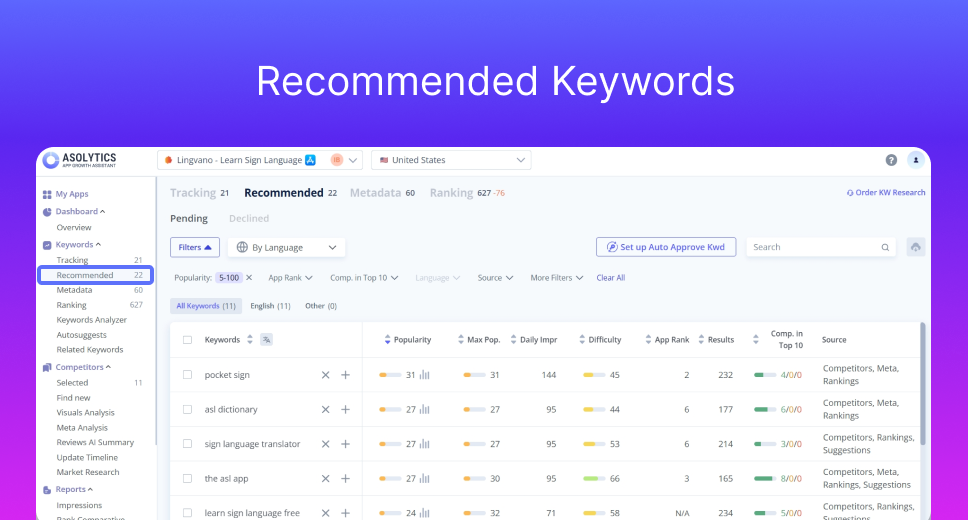
Key Metrics at a Glance
For each recommended keyword, you’ll get the following details:
- Popularity. It shows the search frequency score on a 0-100 scale.
- Max Popularity. This metric reflects the highest search volume the keyword has ever reached. It tells you the ceiling potential. For instance, a keyword currently at 60 but with a max of 95 might spike again during the right season.
- Daily Impressions. The column displays how many times users actually see this keyword in search results each day. A crucial metric for A/B testing.
- Difficulty. Here, you can see the competition intensity. Higher scores mean established apps dominate these terms. Lower difficulty keywords give you faster ranking wins and a better ROI on optimization.
- App Rank. It’s your current position for this keyword. Lower values mean higher visibility (rank #3 beats rank #47). Green numbers show upward movement. Red numbers flag drops that need attention.
- Results. This column shows how many apps appear in search results for this term. Fewer results often mean less competition and a better chance to break into the top 10.
- Competition in Top 10. A visual bar chart breaking down the top 10 results: how many are direct competitors, indirect competitors, or completely unrelated apps.
- Source. Here, you can see where the keyword came from (e.g., competitor analysis, your metadata, related terms, autocomplete suggestions, etc.). This context helps you prioritize faster.
When you spot a high-value keyword, click “+” to add it to your Tracking tool.
Pro Tip: Don’t focus on popularity alone. The real sweet spot is high daily impressions + low difficulty + weak competition in the top 10. These are your quick-win keywords.
Step 3. Auto-Approve for True Automation
To automate keyword research for apps even further, you can enable Auto Approve. It’s a feature that automatically adds selected keywords to your tracking list based on the rules you set. This allows you to scale your research without reviewing every single keyword suggestion.
Start by choosing one or several countries. Then, set your approval parameters. You can use any combination of the following criteria:
- Popularity
- Difficulty
- App rank
- Max popularity
- Competitors in Top 10
- Non-competitors in Top 10
- Estimated daily impressions
- Language
- Source
You can apply the same rule set across all selected countries or create custom rules for a specific market.
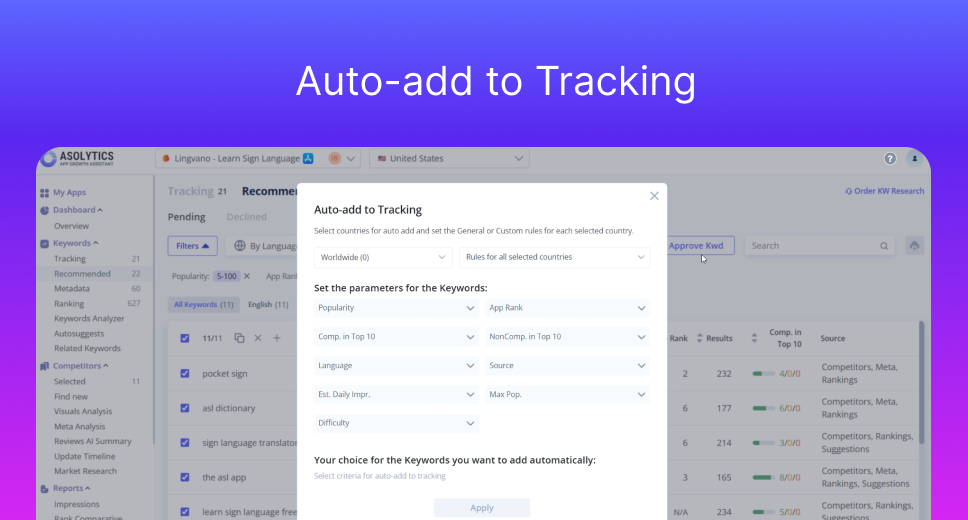
Let’s say you’re launching a meditation app. Your general rules might look like these:
- Popularity: 15-50 (medium competition)
- Difficulty: Max 45
- Competitors in Top 10: At least 3
- Estimated Daily Impressions: Minimum 100
- Source: Competitors + Suggestions
Then, you may specify custom rules for the UK only, such as:
- Popularity: 5-30 (less competition)
- Difficulty: Maximum 35
- App Rank: Only if currently ranking 30 or better
- Estimated Daily Impressions: Minimum 50
With these rules active, every time Asolytics algorithms discover a new keyword that matches your criteria, it automatically gets added to your tracking list. No daily checks. No manual decisions.
Step 4. Automatically Track Your Keywords
All the selected terms, including those added through Auto Approve, appear in the Tracking section. Now, Asolytics algorithms monitor real-time changes across countries and languages. You can see position changes, market trends, keyword opportunities, competitor movements, and more.
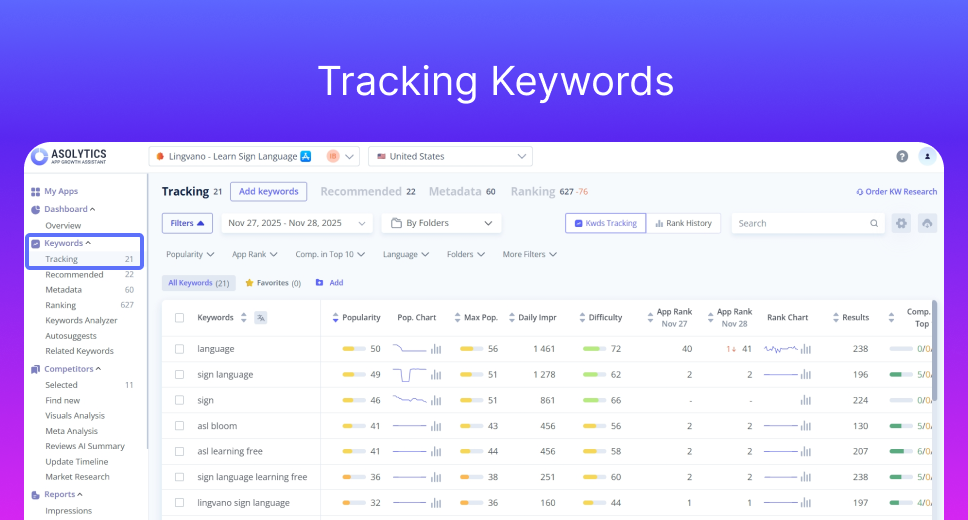
Check your tracking dashboard weekly, and you’ll find fresh, pre-qualified keywords waiting for you. The hands-on part takes about 10 minutes. Then, the workflow runs on autopilot.
And the best part?
You can try automated keyword research for free — Asolytics offers a trial that lets you explore the full system before committing.
Real Use Case: From 4 Hours to 10 Minutes
Still not sure whether automation is actually that good and time-saving? Here’s a real story shared by a fitness app team:
They used to spend around 2 hours manually collecting App Store keywords and another 1.5 hours reviewing five competitors. Add roughly an hour for estimating traffic, and they’d end up with a list of about 80 keywords. After filtering out terms that were too competitive or irrelevant, they had maybe 30 usable keywords. Half of those they were already using.
After switching to Asolytics, the whole process took about 10 minutes. They also discovered 120 new, relevant keywords they would never have found manually. This list included several medium-volume terms with low competition that became their biggest traffic drivers. And the payoff was real: within a month, their app visibility grew by 25% thanks to automated keyword research.
Let Automation Handle the Boring Part
The apps winning in stores aren’t lucky. They’re efficient. They’ve automated the tedious work so teams can focus on creative optimization, conversion, and strategy.
Manual research made sense when app stores were new. Today, with millions of apps competing, it’s like using a flip phone: slow, outdated, and prone to errors.
Asolytics gives you back your time while improving your results. Less guesswork. Fewer missed opportunities. More visibility. Whether you’re an indie developer launching your first app or an agency managing 50, Asolytics scales with you. Start automating your ASO keyword research today with Asolytics—and spend your time where it really matters: growing your app.